
The PlayStation 5 homebrew scene has officially crossed the event horizon. With the public release of the Relapse exploit chain, full kernel read-and-write execution is now active across system software versions 7.00 through 13.60. Spanning both standard PS5 hardware and the PS5 Pro, the exploit has brought the overwhelming majority of retail consoles into the jailbreak fold—arriving at the exact firmware threshold of current-generation blockbusters like Marvel’s Wolverine.
For years, console jailbreaks were quiet affairs reserved for dedicated tinkerers on long-forgotten, obsolete firmware revisions. In 2026, the paradigm has shifted violently. Empowered by modern Vulkan translation layers, the open-source RADV driver stack, and AI-accelerated reverse engineering, homebrew developers have transformed Sony’s flagship console into the ultimate universal gaming box.
If you have an exploitable PlayStation 5 running firmware 13.60 or lower, here is the comprehensive master directory of every major native emulator running on the platform today—alongside a candid look at how Sony’s anti-consumer hardware lockdown accidentally sparked a software renaissance.
The Relapse Breakthrough: Firmware 7.00 Through 13.60
Originally documented via VideoCardz and hosted on the Relapse-Exploit GitHub repository, Relapse combines a WebKit userland entry point with an unpatched kernel exploit to grant arbitrary code execution and payload loading:
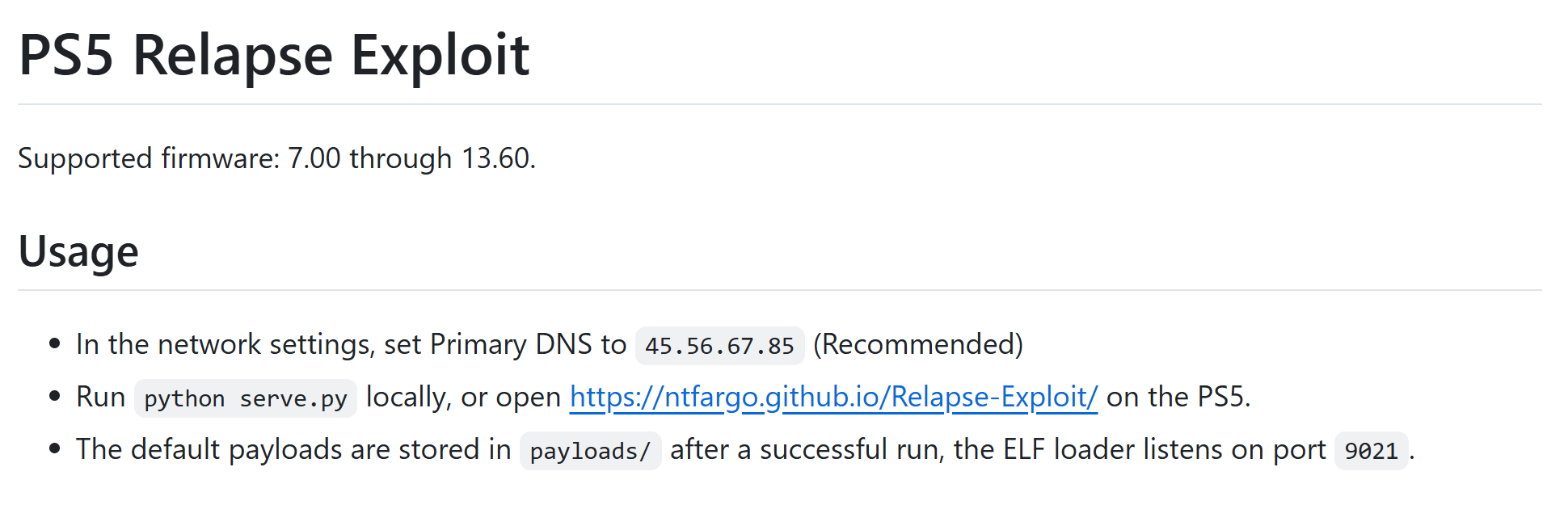
- Firmware Reach: Supports firmware 7.00 up to 13.60. Almost any console purchased over the past two years that has avoided automatic background system updates is eligible.
- Hardware Compatibility: Functions across original "fat" PS5 models, PS5 Slim revisions, and PlayStation 5 Pro systems running compatible software.
- Payload Architecture: Provides a resident ELF loader listening on local TCP port
9021, enabling one-touch injection of homebrew enablers such as etaHEN and kstuff. - The Wolverine Milestone: Retail physical discs for Marvel’s Wolverine reportedly require firmware 13.40, while update
1.001.005runs cleanly on 13.60. Because 13.60 is fully exploitable, developers and researchers can study, debug, and dump current-gen AAA releases directly on target hardware without sacrificing homebrew capability.
Editorial: Sony's Discless Trap & The Frontier AI Counter-Offensive
To understand why the PS5 emulation and homebrew community is erupting with unprecedented intensity, one must look at the predatory trajectory of console hardware design over the last four years.
The Discless Extortion: Pairing Disc Drives to the Cloud
When Sony released the PS5 Slim and followed with the $700 PS5 Pro, they made a calculated bet: remove the optical disc drive by default, and sell an external modular drive as an $80 accessory. But Sony added an insidious anti-consumer snare: the external disc drive requires a mandatory one-time online server handshake with Sony’s infrastructure just to activate and play physical discs.
Consider the dystopian absurdity: if you purchase a brand-new console and keep it offline on firmware 13.60 to maintain your consumer right to run custom software, you cannot even register the physical optical drive to play discs you paid for without being forced into an online firmware update. Sony transformed physical media—the last bastion of game preservation and true consumer ownership—into a revocable digital license tethered to a corporate server.
The Frontier AI Leap: Reverse Engineering at Hyperspeed
Sony assumed that the sheer architectural complexity of the PS5—proprietary FreeBSD-based Orbis/Prospero kernel primitives, encrypted hypervisors, and custom AMD RDNA GPU command streams—would delay homebrew ports for a decade. They failed to anticipate the revolution in frontier AI models.
Across the open-source scene, developers are weaponizing LLMs (such as Claude, GPT-4, and specialized code synthesis agents) to tear open binary architectures at machine speed. What once required teams of assembly experts months of manual Ghidra analysis is now accomplished in days:
- Automating deobfuscation and tracing subtle kernel race conditions.
- Generating translation wrappers between Sony’s proprietary graphics APIs and open-source Vulkan / RADV pipelines.
- Converting legacy PowerPC, Allegrex MIPS, and ARM64 instruction sequences into native x86-64 recompilations.
- Drafting hardware abstraction shims and controller mapping hooks.
The Collapse of the AAA DRM Moat: The GTA VI Reckoning
The consequences for the corporate gaming industry are seismic. The multi-billion-dollar publisher business model depends entirely on a walled-garden moat: lock players into proprietary digital stores, enforce live-service check-ins, charge $70 for remasters of 15-year-old games, and dictate when an purchased title is discontinued.
That moat is collapsing. With exploits reaching firmware 13.60, the temporal buffer between a game shipping on store shelves and being fully liberated has shrunk to near zero. As developer communities prepare for monumental releases like Rockstar's Grand Theft Auto VI, the writing is on the wall: if a title lands on an exploitable firmware baseline, AI-augmented reverse engineering will deconstruct it on day one. Game preservation is no longer asking for corporate permission; it is executing in kernel space.
The Master Directory: Known Working PS5 Emulators
Below is the complete, curated directory of active emulators compiled natively for jailbroken PlayStation 5 consoles, leveraging native AMD Zen 2 CPU execution and Vulkan hardware acceleration.
1. PS5SX2 (Swordpdf/PS5SX2): PlayStation 2 Up to 6x Native

For two decades, PCSX2 has been the gold standard of PlayStation 2 emulation on desktop PCs. PS5SX2, spearheaded by developer Swordpdf, compiles PCSX2 natively for the PS5 operating system, bypassing Linux environments entirely.
- Target Architecture: PlayStation 2 (Emotion Engine + Graphics Synthesizer).
- Rendering Pipeline: Vulkan hardware backend utilizing a customized build of
ps5vkdeveloped by Mihawk-99. - Resolution Scaling: Runs PS2 games at up to 6x native resolution (rendering at pristine 4K and 5K internal framebuffers with zero frame pacing jitter).
- Smartphone Web Dashboard: Features a brilliant local web server. While a game is running on your TV, you can navigate to
http://<PS5-IP>:8080on your smartphone or laptop to configure memory cards, adjust graphics filters, and toggle widescreen hacks in real time. - Format Support: Handles standard
.iso, modern compressed.chd,.cso, and.zsodisc images. - Prerequisites: Requires
kstuffpayload and ShadowMountPlus to mount the application package.
2. ProsperoEden (blackbearreloaded/ProsperoEden): Nintendo Switch

Running current-gen hybrid console titles on Sony’s flagship hardware sounds like science fiction, but ProsperoEden by blackbearreloaded makes it reality. An unofficial PS5 port of the Eden emulator (derived from modern open-source Switch emulation trees), it executes ARM64 Switch binaries via native x86-64 recompilation.
- Target Architecture: Nintendo Switch (Nvidia Tegra X1 / ARM Cortex-A57).
- Graphics Backends: Implements both Vulkan (recommended for performance) and OpenGL fallbacks.
- Performance & Resolution: Supports 4K upscaling patches and unlocked 60/120 FPS frame rate mods. Verified titles like Cuphead hit a rock-solid 60 FPS at native display resolutions.
- DualSense Integration: Direct support for up to four DualSense controllers with native haptic rumble and six-axis motion sensor mapping.
- Self-Contained Loader: Bundles an integrated daemon helper based on
PS5-Lapy-JB-Daemonthat automatically negotiates local ELF loading over TCP port9021without requiring third-party payload injectors.
3. PS5X360 (BrinooTk/PS5X360): Xbox 360
Microsoft’s Xbox 360 and Sony’s PlayStation 3 were bitter rivals during the seventh console generation. In an extraordinary technical twist, PS5X360 by developer BrinooTk allows you to play Xbox 360 games directly on a PlayStation 5.
- Target Architecture: Xbox 360 (IBM PowerPC Tri-Core Xenon + ATI Xenos GPU).
- Upstream Engine: Built upon the cutting-edge Xenia Canary codebase.
- Graphics & Audio: Powered by the open-source RADV Vulkan driver compiled for the PS5 OS, accompanied by low-latency native audio buffers.
- Couch-Friendly Frontend: Features a 3D cover-flow browsing interface, user profile management, per-game save states, and automated box art scraping integrated directly with XboxUnity.
- Compatibility: Early experimental preview. Supports raw folder extracts, standard ISOs, and digital GOD (Games On Demand) / STFS container packages.
4. Porpoise (elripalda/Porpoise): GameCube & Wii

Nintendo’s GameCube and Wii libraries contain some of the greatest titles ever produced, from Super Smash Bros. Melee to Super Mario Galaxy. Porpoise, crafted by elripalda, is a dedicated PS5 port of the revered Dolphin emulator.
- Target Architecture: Nintendo GameCube (Broadway PowerPC) & Nintendo Wii (Hollywood GPU).
- Dedicated TV Interface: Instead of shoehorning a desktop window manager onto a console screen, Porpoise features a custom-built 10-foot TV UI featuring dynamic background music, smooth cover-flow navigation, and high-resolution box art scrapers.
- Controller Perfection: Maps the DualSense controller seamlessly. For Wii software, the DualSense’s internal gyroscope and accelerometer emulate the Wii Remote pointer and shake gestures with remarkable precision.
- Current Version: Version 1.5.1, installed into
/data/homebrew/and booted through standard package launchers.
5. PS5CEMU-HAR (premohq/PS5CEMU-HAR): Nintendo Wii U & 3DS
Why install separate apps when you can run two beloved Nintendo generations in one package? PS5CEMU-HAR by premohq is a powerhouse homebrew suite that combines two distinct emulation engines under a unified umbrella:
- Dual Emulation Engines:
- Cemu: Full-speed Nintendo Wii U emulation, allowing titles like The Legend of Zelda: Wind Waker HD and Xenoblade Chronicles X to shine.
- Azahar: Dedicated Nintendo 3DS emulation, rendering handheld dual-screen classics on your television.
- Driver Pipeline: Renders directly via the native PS5 port of the RADV Vulkan driver, taking full advantage of the RDNA2 graphics architecture.
- Unified Launcher: A streamlined home screen lets you switch between Wii U and 3DS libraries, tweak resolution scaling, and configure DualSense button mappings on a per-game basis.
- Release Status: Version 3.0.0 is available for instant installation.
6. XPSemu (ZiZc3/XPSemu): Original Xbox (2001)
The original 2001 Microsoft Xbox was notoriously difficult to emulate for over a decade due to its custom Nvidia NV2A graphics processor. Thanks to developer ZiZc3, XPSemu brings the acclaimed xemu emulator (v0.8.136) natively to PlayStation 5.
- Target Architecture: Original Xbox (Intel Coppermine Pentium III + Nvidia NV2A).
- Resolution Enhancement: Alpha 1 supports up to 4x internal resolution scaling, transforming murky 480p Xbox titles into razor-sharp high-definition presentations.
- Playable Showcase: Iconic titles like Halo: Combat Evolved, Halo 2, and Jet Set Radio Future are fully playable, achieving smooth 30 to 60 FPS performance when paired with community performance patches.
- Requirements: Users must supply their own legally dumped Xbox BIOS (Complex 4627 or retail), MCPX boot ROM, and formatted virtual hard drive image (
xbox_hdd.qcow2).
7. snes9xPS5 (MisterTemaki/snes9xPS5): Super Nintendo
While multi-system frontends are fantastic, sometimes you want an instantaneous, dedicated app designed specifically for 16-bit perfection. snes9xPS5 by MisterTemaki ports the renowned Snes9x 1.63 engine into a bespoke PS5 home screen application.
- 3D Game Shelf Interface: Taking visual cues from PS5SX2, the emulator presents your SNES ROM library on a dynamic 3D shelf with automated cover art and cartridge renders.
- Sub-Frame Latency: Direct audio and controller polling ensures near-zero input lag, crucial for precision platformers like Super Mario World and Mega Man X.
- Instant In-Game Menu: Pressing L3 + R3 during gameplay brings up an instant overlay for save states, CRT scanline filters, and control remapping without interrupting your session.
8. PS5_RetroArch (mihawk-99/PS5_RetroArch): The Multi-System Titan
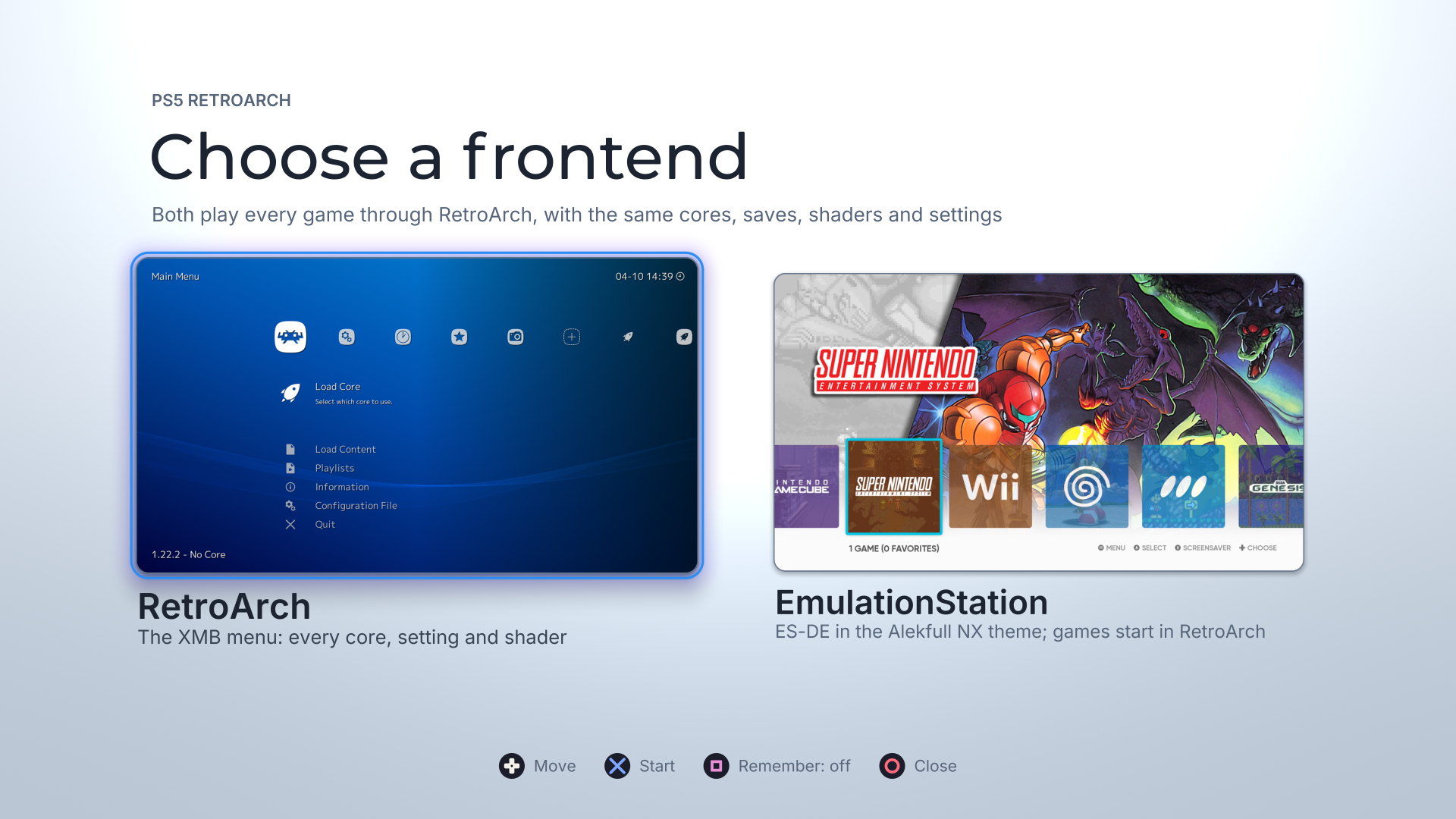
No emulation guide would be complete without RetroArch, and developer Mihawk-99 has delivered what is arguably the most feature-complete homebrew title on the PlayStation 5 to date.
- Dual Frontend Selection: When launching
v0.6.7-alpha.6, you are greeted with a slick pre-screen prompt: launch into the iconic RetroArch XMB interface, or boot directly into EmulationStation (ES-DE) wrapped in the stunning Alekfull NX theme. - Fifteen Launch Cores: Features out-of-the-box hardware-accelerated libretro cores spanning NES, SNES, Sega Genesis/Mega Drive, Arcade (FinalBurn Neo), Game Boy Advance, PlayStation 1 (SwanStation / Beetle PSX), Sega Saturn, and PC Engine.
- The Purple WebUI (
http://<PS5-IP>:6769): RetroArch hosts its own background HTTP server on port 6769. While relaxing on your couch, you can open your phone or PC browser to drag-and-drop ROMs directly to the PS5's internal SSD, organize playlists, backup save states, and tweak slang shaders on the fly.
Installation & Quick-Start Guide
To set up and run any of these emulators on your console, follow this streamlined workflow:
- Verify System Firmware: Go to Settings > System > System Software > Console Information. Ensure your system software is between 7.00 and 13.60. If so, immediately disable all automatic downloads and updates under System Software Updates and Settings.
- Trigger the Relapse Exploit:
- In Network Settings, set your Primary DNS to
45.56.67.85(the community host redirect). - Navigate to User’s Guide to trigger the WebKit exploit, or host the exploit locally by cloning Relapse-Exploit and running
python serve.pyon your computer. - Once the kernel exploit succeeds, the ELF loader service will initialize on port
9021.
- In Network Settings, set your Primary DNS to
- Deploy Homebrew Payloads:
- Send the latest etaHEN payload via Netcat or your favorite payload sender tool (e.g.,
nc <PS5-IP> 9021 < etaHEN.bin). - Ensure kstuff and ShadowMountPlus are enabled to support homebrew package mounting.
- Send the latest etaHEN payload via Netcat or your favorite payload sender tool (e.g.,
- Prepare Storage & BIOS:
- Format an external USB 3.0 SSD or thumb drive to exFAT.
- Create your homebrew directories under
/data/homebrew/or load your game ROMs into organized folders (e.g.,/PS2/,/Switch/,/Xbox360/). - Place legally dumped system BIOS files (PS2 BIOS, Switch prod.keys/title.keys, Xbox mcpx/bios) into their respective emulator system paths.
- Launch and Play: Install the emulator PKG or mount the homebrew folder via the PS5 Homebrew Store or ShadowMountPlus, boot the app, and enjoy native retro gaming powered by AMD Zen 2 and Vulkan!
The Bottom Line
The convergence of the Relapse 13.60 exploit, cutting-edge Vulkan driver ports, and the explosive velocity of AI-assisted reverse engineering has inaugurated a golden age for the PlayStation 5. What Sony envisioned as a locked-down, discless digital tollbooth has been reclaimed by the community as the most versatile, high-powered emulation station on the planet.
Whether you want to experience Gran Turismo 4 at 5K resolution, jump into Halo 2 on a DualSense, or preserve your physical game collection against digital obsolescence, the tools are here, they are open source, and they are running today.