

When Electronic Arts and Petroglyph released the Command & Conquer Remastered Collection in 2020, real-time strategy veterans rejoiced at the 4K revitalization of Tiberian Dawn and the original Red Alert. Yet for fans of Westwood Studios’ crowning isometric masterpiece—2000’s Command & Conquer: Red Alert 2 and its beloved 2001 expansion Yuri's Revenge—the wait for an official remaster has dragged on for over two decades with no end in sight.
Because Westwood’s proprietary 2.5D voxel engine source code was never made public, running Red Alert 2 on modern Windows 10 and 11 has long been a battle against technical obsolescence. Players have been forced to rely on finicky DirectDraw compatibility wrappers (like CnC-DDraw) that frequently crash during Alt+Tabbing, corrupt menus, or glitch at widescreen resolutions. While community projects like OpenRA are extraordinary, they are clean-room reimplementations that approximate mechanics rather than executing Westwood’s authentic game logic, unit balance, pathfinding, and cinematic campaign scripting.
Now, preservation engineer sp00nznet has delivered the ultimate solution. Leveraging the open-source pcrecomp toolchain, the developer has unleashed redalert2-recomp—a complete static binary recompilation of Red Alert 2 and Yuri's Revenge from their original Win32 x86 binaries into pure, native C.
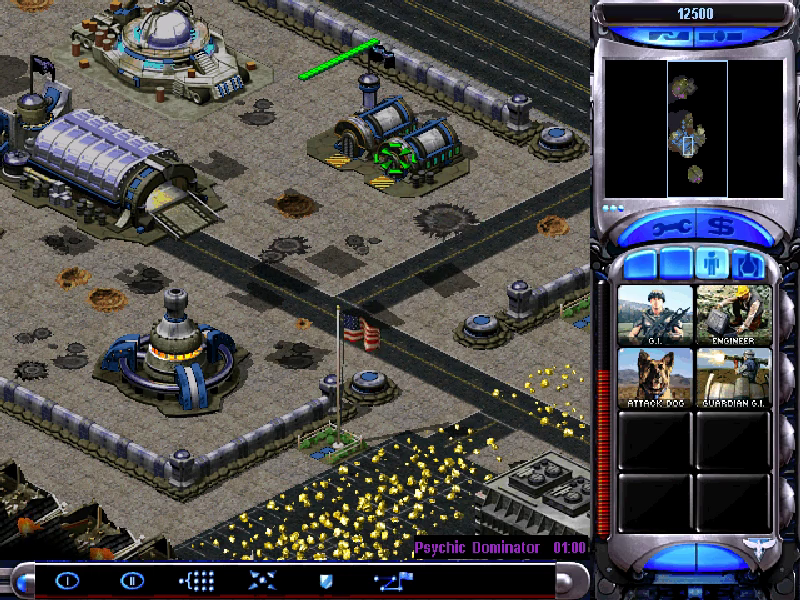
The Engineering Triumph: 5.8 Million Lines of C, 0 Lift Errors
Unlike traditional emulation or bytecode translation, redalert2-recomp does not emulate the PC hardware or run through an interpreter. Instead, the shipping x86 machine code of gamemd.exe (v1.001) has been statically decompiled and lifted into standard, portable C code that compiles directly with modern MSVC and Clang toolchains.
The scale of the binary recovery is staggering:
- Deep RTTI Class Reconstruction: The toolchain recovered 954 C++ classes, 1,214 virtual tables, and 6,665 virtual methods from Westwood’s original compiled binary.
- Comprehensive Function Cataloging: Automatically identified and mapped 24,940 functions, representing over 91.8% of the game’s
.textexecutable code segment. - Flawless Static Lift: Statically converted all 24,954 functions into 5.8 million lines of native C with zero lift errors.
- Dual Target Support: The pipeline also compiles the base Red Alert 2 executable (
game.exe), lifting 23,202 functions with zero errors into its own native binary.
Because the project compiles Westwood’s authentic code, every single quirk of the original game remains 100% frame-accurate: the physics, AI behaviors, unit veterancy, superweapon countdowns, and iconic Bink video cutscenes run exactly as they did in 2001.
Goodbye DirectDraw: Modern Direct3D 11 Presentation
The most immediately noticeable upgrade is the elimination of legacy Windows DirectDraw. In the original 2001 release, the engine commandeered the entire display in exclusive fullscreen, making multi-monitor navigation and desktop multitasking an exercise in frustration.
redalert2-recomp introduces a modern Direct3D 11 presenter window that transforms the user experience:
- Windowed & Borderless Fullscreen: Seamlessly toggle between resizable windowed mode and borderless fullscreen (
F11orAlt+Enter). You can Alt+Tab freely without locking up your desktop or corrupting display surfaces. - Advanced Display Shaders (
F12): Cycle instantly through multiple real-time presentation filters, including Sharp-Bilinear (keeps pixels razor sharp while blending sub-pixel motion), authentic CRT scanlines, smooth bilinear, and pure integer nearest-neighbor scaling. - In-Game Settings Overlay (
F10): PressF10or right-click outside the active playfield to open an on-the-fly graphical configuration menu. Adjust display scaling, border styles, resolutions, and HD vehicle settings without ever touchingRA2MD.INItext files. - Framed Menus: Rather than boxing the classic 800x600 menu screens between jarring black voids, widescreen windows frame the interface over a tasteful, soft dark blur of the menu itself.
2x HD Voxels: Sharper Tanks and Smooth Shadows
One of the most innovative visual breakthroughs in redalert2-recomp is its treatment of voxel rendering. In Tiberian Sun and Red Alert 2, Westwood famously built all mobile units—tanks, Harvesters, Dreadnoughts, Kirov airships, and Apocalypse tanks—using volumetric voxel models (.vxl), rotating and rendering them dynamically into the 2.5D isometric world.
Originally, voxel units were rendered at the same low 1x pixel grid as the terrain, with unit shadows drawn as a crude, stippled dither pattern. redalert2-recomp introduces HD Vehicles:
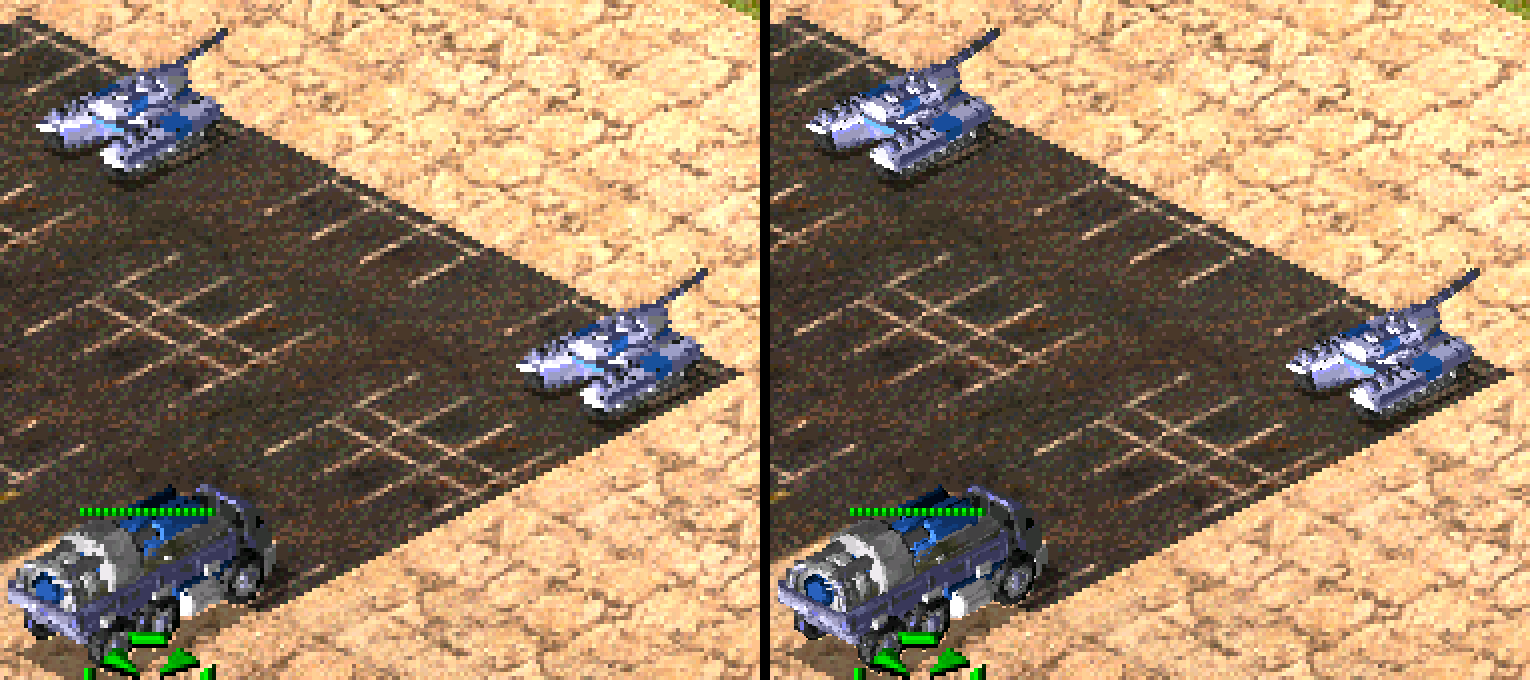
- Double-Resolution Voxel Rasterization: By taking four half-pixel-offset renders of each unit's proprietary voxel model, the engine draws tanks, turrets, and aircraft at twice the resolution of the surrounding map.
- Smooth Silhouettes & Gun Barrels: Tank barrels, treads, and aircraft wings appear clean and sharp, eliminating the jagged pixel stair-stepping of the original software rasterizer.
- Solid Dynamic Shadows: Shadows are drawn with smooth, filtered edges rather than 1-bit dithered dot patterns.
- Zero Frame-Time Cost: Because modern processors easily outpace 2001 hardware, 2x voxel generation introduces zero measurable performance overhead.
Widescreen 4K Support and the Sidebar Bugfix
The port allows commanders to run the game natively at modern 16:9, 16:10, and ultrawide resolutions—from 1080p all the way up to native 4K (3840x2160).
At 4K, the amount of battlefield visible on screen is breathtaking, granting immense tactical awareness. However, pushing original Red Alert 2 to 4K has historically caused fatal crashes. In 2001, Westwood's programmers assumed no monitor would ever exceed ~1200 vertical pixels and allocated a fixed-size internal array for construction sidebar buttons. At 4K, the vertical height causes the sidebar to exceed its memory bounds, instantly crashing the game.
Because redalert2-recomp operates directly on the lifted source code, the developer fixed this decades-old buffer overflow at the root, allowing the construction sidebar to scale gracefully at 4K without stability issues.
Rigorous Automated Testing and LAN Multiplayer
To ensure absolute parity with the retail release, the project includes an exhaustive playtest harness (tools/playtest.py) featuring 29 out of 29 automated passing test suites:
- Scripted Verification: Automated scripts execute full menu navigation, skirmish match setups, unit commanding (band-box selection, force-firing, deploying MCVs), and both Allied and Soviet campaign missions.
- Differential Testing: A dedicated
--originaltesting flag executes the identical input scripts against the original shipping machine code to verify that recompiled C routines produce byte-for-byte identical game state. - Headless Video Recording: The entire game can run in a headless environment, capturing primary surface frames directly to MP4 via FFmpeg.
- Out-of-the-Box LAN Multiplayer: Includes native IPXEmu integration, allowing two modern PCs to connect over local networks and battle seamlessly.
How to Build and Play
In accordance with strict legal preservation practices, no proprietary EA or Westwood assets, audio files, or game archives are hosted in the repository. The build pipeline operates directly on your legally owned copy of the game:
- Download or clone the redalert2-recomp repository.
- Ensure you have the official Steam release of Command & Conquer: The Ultimate Collection installed.
- Double-click
Setup.cmd. The automated setup verifies your environment (Python 3.10+, Visual Studio 2022 C++ tools, CMake, Ninja), locates your Steam installation, extracts the function catalog, and lifts the game into native C. - Run
Red Alert 2 (recomp).cmdto jump straight into Yuri's Revenge!
The Preservation Verdict
For twenty-five years, Command & Conquer: Red Alert 2 has stood as a monumental pillar of the golden age of RTS gaming. By bypassing the limitations of abandoned DirectDraw and decompiling Westwood’s closed-source executable into modern, maintainable C, redalert2-recomp delivers the definitive PC remaster the community has dreamed of for decades.
Kirov reporting—and this time, it's in 4K.